What do I recommend for a first printer?

There are many printers on the market from many different manufacturers and there are many considerations to make when purchasing a first or new printer. Anyone who gives advice is doing so from those printer manufacturers they’re familiar with. Additionally, 3d printers are subject to environmental factors (printing in a room with a draft or one that’s kept very cold) and print configuration options which can negatively impact your print, causing frustration.
Therefore, the below is simply what I recommend based on what I’m familiar with. I provide as much information as possible so you can make an informed decision. Again, please understand that you could have a perfectly working printer but locate it in an area that isn’t ideal or print to it with bad configurations that cause failed prints and frustrations. The following should not be the end of your purchase, setup, troubleshooting processes but should be a guide to simply get you going.
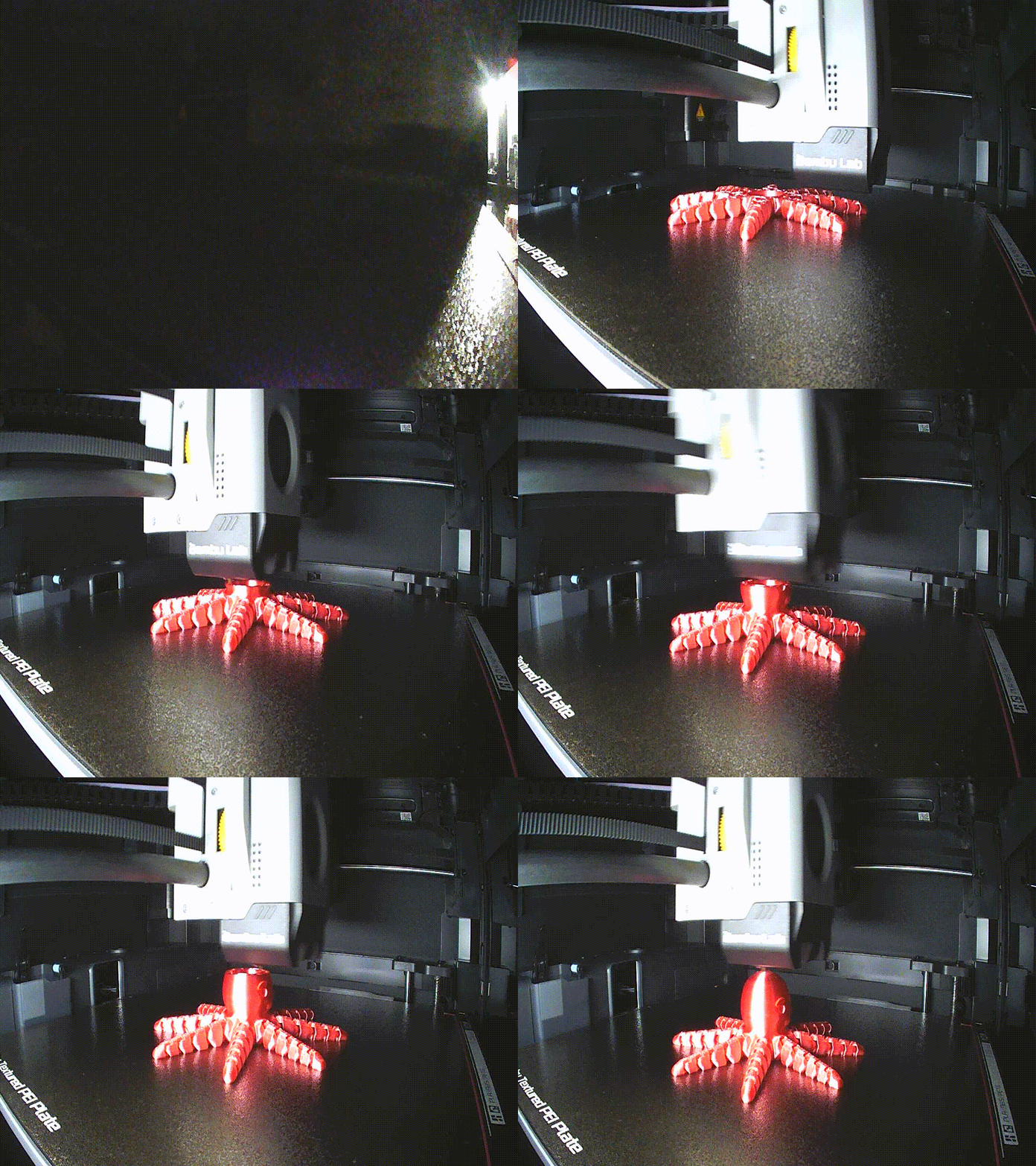
You may first ask, how does 3d printing work?
- Filament (a continuous plastic speghetti on a roll) gets fed into the printer.
- The printer pulls the filament through a hot-end (a very hot metal block that melts the plastic) and extrudes it (pushes it out) onto a build plate (the surface the print’s first layer adheres to).
- The hot-end moves around the bed (and it may move up or the bed may move down) to create the 3d model beginning at the first (bottom) layer.
- One layer is created at a time with each new layer sticking to the layer before it.
Recommendation – Over-simplified answer
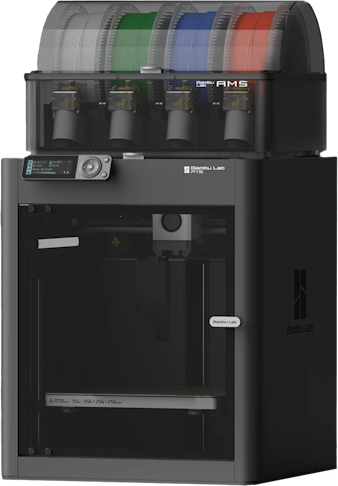
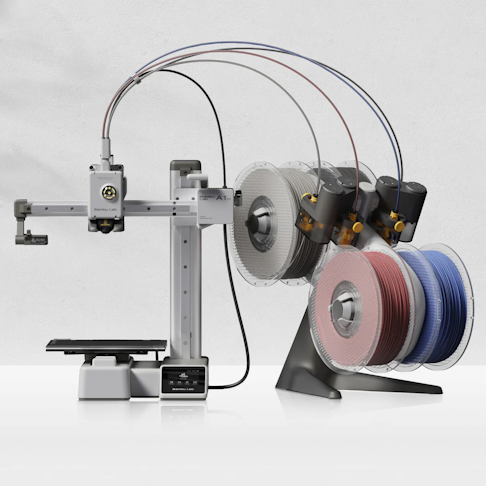
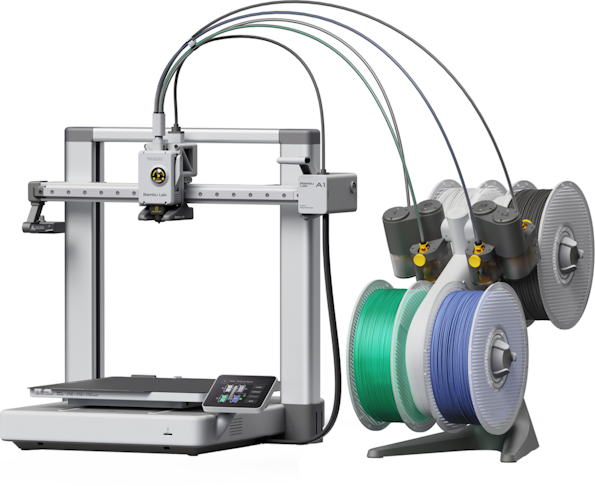
- I recommend either the Bambu Lab P1S or the Bambu Lab A1 Mini as your first printer. I don’t recommend the Bambu Lab A1 unless you really don’t want an enclosed printer but want a larger build plate.
- In addition, you may want to buy a Bambu Lab AMS (automatic material system) unit for the printer.
- The AMS (first gen), AMS2 Pro (current, new model as of Q3 2025), and AMS Lite are GREAT additions and make loading filament much easier.
- You don’t have to have an AMS but loading filament is so much simpler AND you can then print with up to 4 colors. An example of a multi-color print would be this Minecraft TNT model on Bambu’s Makerworld.
- Select the COMBO option on the Bambu Lab printer links above to see the price of the printer with AMS / AMS-Lite. If you were to buy a printer with a choice of AMS or AMS2 Pro, I’d buy the AMS2 Pro.
- Also, I recommend a Textured PEI Build Plate with the printer regardless of the printer you buy. It will give less frustration. See the Bambu Lab Build Plate page (be sure to pick the size for the printer you buy).
- Note – as of Q4 2024, Bambu Lab has newer models of enclosed printers – some with larger build volumes and some with integrated laser burners or material cutters (like Cricut). These three models are older models and are 3d printers only.
- There are also other reputable companies that you may want to consider: Snapmaker, Elegoo, Flashforge, Sovol, and Creality. For example, the Elegoo Centauri Carbon is supposed to be a good printer but I don’t have first hand experience. The Flashforge Adventurer 5M might be another, less expensive, option to consider though the 5M and AD5X are not enclosed. (The AD5X is a multi-color unit)
Recommendation – The long answer
I own a Bambu Lab P1S with AMS, an A1 with AMS Lite, and A1 Minis with AMS Lite. Of those, I recommend either the A1 Mini or the P1S (which has been replaced by the P2S though I understand you can still buy the P1S at reduced cost (Q4 ’25)). The A1 model is good but its build plate attachment is finicky compared to the others – it’s still a good printer so if that’s what you feel is best, it’s still a good choice.
I do also own a Flashforge Adventurer 5M that I created sides and a top for making it enclosed. It is a quality printer and prints about as fast as my Bambu Lab machines but it’s print quality, while very similar, is sometimes just slightly less than that of the Bambu Lab P1S, A1, and A1 Mini though you’d have to look carefully to see the differences.
Bambu Lab is a Chinese company. By default, the process where you send a file to the printer DOES go to Bambu’s cloud. Some people don’t like that. Like seemingly most, I’ve decided to ignore this for now. Just a concern I want to make clear. Some other companies do this same send-to-their-cloud process and some don’t. I believe most of the major brands DO by default. You can set up to NOT use Bambu’s cloud but you lose some features (that you may decide you don’t care for anyway). Using the cloud does require an Internet connection of course. Either solution does require the printer be connected to the WiFi as you will send prints to the printer from a computer (or possibly from a cell phone).
Bambu Lab Model Specifics
The two big differences between the three models (P1S, A1, and A1 Mini) are the print bed size (the biggest size item you can print) and being an enclosed print space or not.
All three of these models allow for attaching an optional “AMS” unit to them so you can print in up to 4 colors (or more if you have more than one AMS or AMS2 Pro).
Size
- The A1 Mini has a 180mm3 print volume (the build plate is 180mm x 180mm and you can print up to 180mm tall).
- The A1 and P1S have a 256mm3 print volume.
- A larger build plate / print volume allows for bigger prints OR more printed objects on one build plate.
- A smaller build plate generally heats up faster and uses less electricity.
- The cost to replace a smaller build plate (it is a consumable item) is usually less as well.
Enclosed / Open
- The P1S is enclosed. The A1 and A1 Mini are open – not enclosed.
- Some types of filament (ABS for example) require or usually require that the print be enclosed when printing to retain heat.
- Some types of filament (ABS for example) smell terrible when printing and are toxic to breathe (to some degree) and you will want an enclosed printer to retain heat but have a fan pointed at the printer to send fumes out an open window.
Filament Types
There are many types of filament materials you can print with. The starting point would be “PLA” Bambu Lab Store – PLA Basic . Filament comes on a spool and the cut beginning of the filament gets loaded into the printer – being sure it doesn’t unspool all over which can cause tangles. The AMS and AMS2 make loading filament much easier and greatly reduce possibilities of unspooling and tangles. The AMS Lite helps with both but I’d say the possibility is slightly more. Loading filament without an AMS / AMS-Lite is doable but is a longer process. Bambu makes it simpler but I’d say it takes 5 seconds to load filament with an AMS verses maybe 30 seconds to 2 minutes without an AMS. (I have one A1 Mini with no AMS and all other non-Bambu Lab printers also don’t have AMS units)
- PLA is the usual type of filament. It is great for visual, toy, general prints. If I have given you 3d prints, they were most likely done in PLA. I cannot, nor can anyone else I’ve had in my print area, detect any smell when printing PLA. I get migraines and I don’t have any issue being in the same room printing PLA on 6+ printers for 8+ hours.
- PETG is another common type of filament. It is often more structural than PLA. PETG does have a minor noticeable smell when I run many printers for hours but it doesn’t give me a headache at all.
- ABS is generally an even stronger type of filament. You could use ABS if the print will be outside or in direct sunlight all the time. PLA will generally not hold up to that while PETG might and ABS generally will. ABS requires a hot environment while printing meaning an enclosed printer is basically required. ABS will make you nauseous if printed next to you in an enclosed space without ventilation. If I print ABS, I have a window open with fan pulling air in, a fan on the printer moving air past it and out an open window. When its cold outside, I have printed without ventilation when I’m not in the room (with closed doors) and have opened windows/doors with fans blowing outside for 5-10 minutes after printing is done.
- TPU is a very flexible type of filament. It is great for printing gaskets, door stoppers, bumpers, etc. Print failures or issues will occur if TPU isn’t dry enough. TPU cannot be fed through an AMS unless you have Bambu Lab’s AMS-specific TPU filament. You would load TPU into the printer bypassing the AMS or AMS-Lite.
- There are many other types of filament but its likely not worth considering them right now unless you believe you will be printing functional, structural prints that will need to withstand extreme heat, load, stress, etc. Those demands can be met with other filament types but those require even hotter print bed or nozzle temperatures or even heated print chambers.
- The one other item that you may want to consider is abrasive filaments… Glow-in-the-dark filament, some filament with shiny/shimmery glitter type looks, and all filaments that have wood or carbon fiber (CF) or glass fiber (GF) included are abrasive. These elements can be part of PLA, PETG, and ABS filament (I print with PLA-CF and PETG-CF often) and require a hardened nozzle and extruder gears. PLA, PETG, and ABS by themselves do not require these upgrades.
Environmental Factors
The location where the printer sits in the house is important to consider as environmental factors play a major role in print quality and adhesion. If the room is too cold, the print bed may take a long time to heat up and may not stay at a constant temperature or may have a problem doing so. With an open printer, if the room has a draft or a fan is on regularly, the first layer may have trouble adhering to the build plate which can cause a print failure. Environmental temperature changes during the print can cause failures – the print could lift off the build plate and the print could stop, a layer being printed may not adhear to the previous layer causing a break somewhere in the print, or you could even end up printing a giant blob because the print lifts off the build plate and sticks to the nozzle causing filament to blob all over the nozzle and top of the print. If the environment cannot be controlled, an enclosed printer may be a better option.
Filament also needs to be dry when printed. Most types of filament are hygroscopic – meaning they absorb moisture from the air. Filament spools should not be kept in the open room unless the room is less than 35% humid. Spools should not be opened until actually needed. I keep open spools in a “dry box” – a tupperware bin with a waterproof seal in the lid and have desicant (the little beads that suck up moisture) in the bin. I also have a digital hygrometer in the box to be sure it stays at 35% relative humidity or less. I also have a filament dryer to dry TPU before and during printing and to dry open spools of other types of filament as needed.
If the printer room is likely never 35% or less, an AMS2 Pro may be a good choice as it has an active dryer built in.
Summary
After reading through the above, the printer breakdown likely looks like this:
- A1 Mini or A1 – Print PLA or PETG in an environment that can be controlled
- P1S – Print PLA, PETG, and ABS in an environment that cannot be well controlled
- A1 or P1S – Print larger models
- AMS or AMS-Lite with the printer if the environment can be controlled (specifically the room is 35% or less relative humidity) or AMS2 Pro is not.
- The AMS-Lite is used by the A1 and A1 Mini by default. The AMS and AMS2 Pro are used by Bambu’s other printers like the P1S – the AMS-Lite doesn’t connect to those. The AMS and AMS2 Pro can connect to the A1 and A1 Mini but require additional hardware.
Other Accessories
Filament
Filament (1.75mm diameter! -There is another less common size) can be purchased directly from Bambu Lab but can also be found on Amazon.com or at physical store MicroCenter (“Inland” brand). I have had luck with filament (PLA, PETG, ABS, and TPU) from these brands: Inland, Bambu Lab, SUNLU, Jayo, Overture, Soleyin, Elegoo, and Kingroon.
Filament Related Items
- I use these Ezy Waterproof Storage Bins for storing open spools of filament: Home Depot
- I have a digital hygrometer in each waterproof storage bin: Amazon
- Filament dryer: Amazon
- Side cutters for cutting filament: Amazon
- Deburring Tool for removing burs on edges of prints: Amazon
- Small butane torch for quickly burning off fuzzies from prints (also get extra butane – can get from Home Depot): Amazon
- X-Acto knife for removing stringing from prints: Amazon
- May also need Needle Files for cleaning up prints: Amazon
- Desiccant can be used in the waterproof storage bin (or even in large enough ziplock bags) to keep open spools of filament dry enough.
- Models can be 3d printed that hold loose desiccant bead like these: Amazon
- Or commercial products exist with those beads inside that can be plugged into an outlet to heat the moisture out and “recharge” for continued use: Eva-Dry on Amazon
Printer Consumables
- .4mm Hardened Steel Hotends: Bambu Lab A1 or complete (with fan, heater, thermistor) Bambu Lab P1S
- Textured PEI Build Plate (select the right printer option)
- Other consumables and parts that will have to be replaced much less frequently are also available from the Bambu Lab store or from Amazon